Landing pages
Landing Pages That Make Bought Adult Traffic Pay
Fast, single-purpose pages make bought adult traffic pay: a light pre-lander for cold clicks, a direct link for warm ones, and as few steps as possible between the ad and the payout. The bid only buys the visit. What happens in the next few seconds depends on the page.
Fix the page before raising the bid. You pay for the click the moment it lands, so slow loading or one extra form field comes straight out of your margin.
Direct Link or Pre-Lander
Pre-landers suit cold traffic, while direct links suit clicks that are already warm. A popunder visitor did not choose to see your page, so a short bridge asking for one easy tap turns an accidental view into a decision. A native click came from someone who read a headline and tapped on purpose, and an extra screen in front of that person is mostly an extra exit.
Use a pre-lander only when it does a job the offer page cannot: confirming age, repeating the promise from the ad, or setting expectations before a card form. If the offer page loads fast and asks for one action, a pre-lander in front of it is a tax on every click.
| Setup | When to use it | Formats it pairs with |
|---|---|---|
| Direct link | Retargeting, known brand, one-action offer | Banner, popunder |
| One-tap pre-lander | Cold click into a 1-click or SOI flow | Popunder, in-page push |
| Message-match pre-lander | Ad copy needs a bridge to the offer | Push, in-page push |
| Content pre-lander | Card form or paid membership | Native, video pre-roll |
Split-test both setups on popunder, where either choice is reasonable and the winner changes from offer to offer.
Count the Steps Between Click and Payout
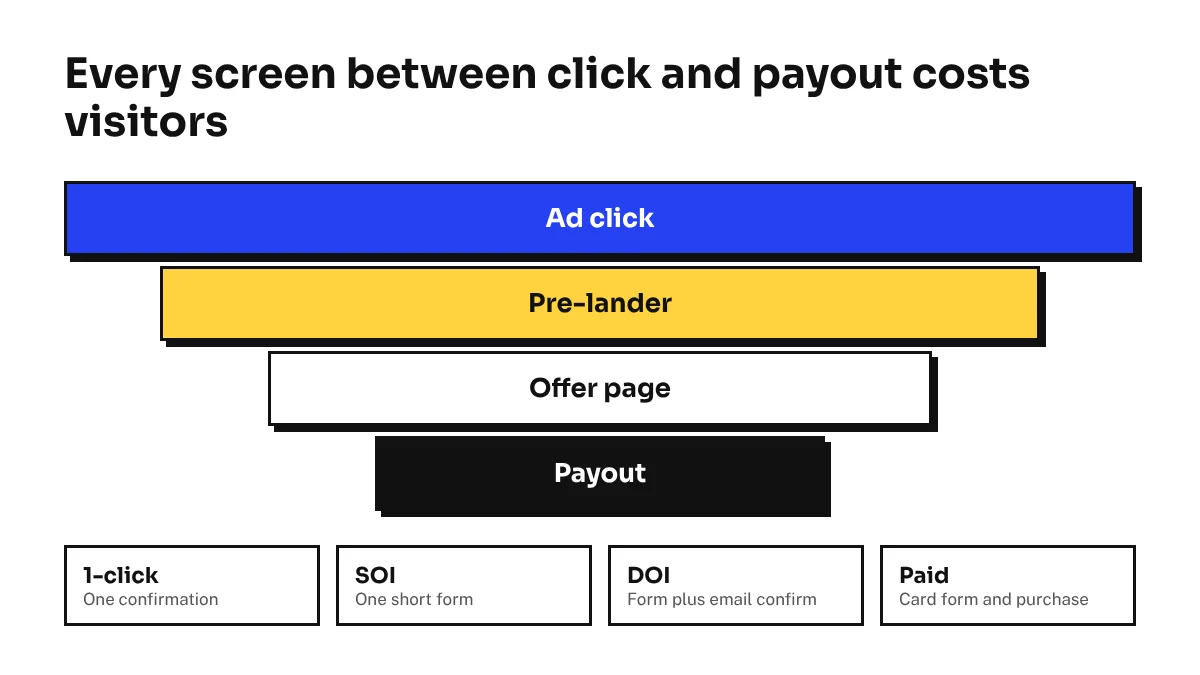
Every extra step costs visitors, so count the steps before choosing a page or a format. List each screen and tap from the ad to the moment the conversion fires. That count tells you how warm the traffic has to be.
- 1-click. One confirmation fires the payout, so cheap cold volume can carry it.
- SOI. Single opt-in pays on an email or account submit, which makes the whole job one short form.
- DOI. Double opt-in pays only after the email is confirmed, so part of the drop-off happens in an inbox you never see.
- Paid membership. A card form and a purchase, which needs the warmest click you can buy.
Match the step count to the format. AdsCompass positions popunder for 1-click flows and SOI, push for subscriptions and recurring billing, and native for multi-step signups and paid membership. Paid membership on raw popunder can still convert, but you are asking for a card number from someone who never chose to see you.
Cut your own steps before blaming the traffic. Fold the age confirmation into the pre-lander button, drop every optional field, and leave the offer's flow as the only multi-step part.
Speed and Mobile Layout
Slow pages waste paid clicks before anyone reads a word. Popunder, push and in-page push are bought on CPC, so you pay once the click registers, and a visitor staring at a blank screen presses back before your page paints.
Check the device mix before you design. The AdsCompass Traffic Calculator shows volume by GEO and format with a mobile, desktop or combined filter, and it opens after free registration with no deposit. If your GEO leans toward phones, build the phone version first.
- Serve static HTML with critical CSS inline and no heavy JavaScript framework.
- Keep one compressed image above the fold and the call-to-action on the first screen, inside thumb reach.
- Count the redirects: tracker, pre-lander, affiliate link and offer can stack into several hops, each one slow on mobile data.
- Test on a mid-range Android phone over a cellular connection, not only on office Wi-Fi.
iOS needs its own check. In-page push is the format AdsCompass points to for iOS traffic, and Safari's collapsing toolbar changes the visible screen height, so a button that sits perfectly on Android can end up hidden on an iPhone.
Match the Page to the Visitor's Language
Translate the page into the visitor's language, and read that language from the browser, not only from the IP. VPN use rises in markets with age-verification laws, so some clicks report a country the visitor does not live in. The browser still tells you what they read.
Split campaigns by language. AdsCompass targets by browser language, so I would run one campaign per language, each pointing at its own page, instead of one page that guesses with a script.
- Prices in local currency and payment methods people in that country actually use.
- A call-to-action written by a native speaker, since machine translation often misses on short buttons.
- Age-gate wording and legal notices that fit the jurisdiction; check local rules with a lawyer for each market.
Keep the GEO promise consistent. The offer must accept users from the country you target, or every click that reaches it is wasted.
Keep the Destination URL Clean
Broken or flagged links cause two of the three common rejections on AdsCompass (adscompass.com): a link entered incorrectly and a destination URL with many VirusTotal alerts. The third is a plain breach of terms. Moderation usually clears in about ten minutes, so a fix and resubmit is quick.
- Open the exact submitted URL in a clean browser profile and confirm it lands on the declared page.
- Check every macro against the documentation, because one typo in a placeholder can break the tracker redirect.
- Scan the domain and final page on VirusTotal before submitting and after every change to the redirect chain.
- Check a newly bought domain's history, since old malware or redirect abuse can leave alerts behind.
Strip aggressive scripts from the lander. Forced downloads and back-button hijacks are the behavior security vendors flag, and alerts on one domain sink every campaign pointing at it.
Measure Each Page Per Source
Track every lander per source ID, or you are judging pages on blended averages. A tracker rotates landers, records which one each visitor saw, and receives the conversion through a postback. On AdsCompass, CPV Lab and CPV One have documented integrations, while Keitaro, Binom, Voluum and RedTrack connect through S2S postback templates that take about an hour.
Pass the source ID and click ID macros in the destination URL. The click ID ties the conversion to the click, and the source ID ties the click to the exact site that sent it. Add the creative ID if you test ads and landers at the same time.
Compare landers source by source, not in total. A lander can win the blended figure because two small sources love it while losing on the source that carries most of your spend. Build the report as a grid of lander against source ID and read cost per conversion in each cell.
Read the grid cell by cell
Divide spend by conversions in each cell. As plain arithmetic, $60 for 12 signups is $5 each, and $60 for 8 signups is $7.50 each. That gap only means something if both landers ran on the same sources at the same hours, so rotate them inside one campaign.
Fifty dollars is enough to start testing landers. A first top-up of that size lets you buy adult traffic on AdsCompass for one lander grid, and its reports show what each site delivered, so the grid fills from the first campaign. When a lander and source pair clearly wins, source ID bidding gives that site its own bid.